Guide/SendApp Agent/Contacts & CRM
Contacts, tags, and custom fields
The Contacts section is your CRM: the address book where your customers live with their data, tags, and notes. Organizing it well is the foundation of every targeted campaign: today's tags are tomorrow's campaign segments.
Updated on June 16, 2026 · 6 min read
Before you start
- A SendApp Agent account
- Contacts collected from conversations or ready to import
The address book
Every person who messages you becomes a contact. In the Contacts section you see the full list with name, number, tags, and date. You can search, filter by tag, and open each contact's card.
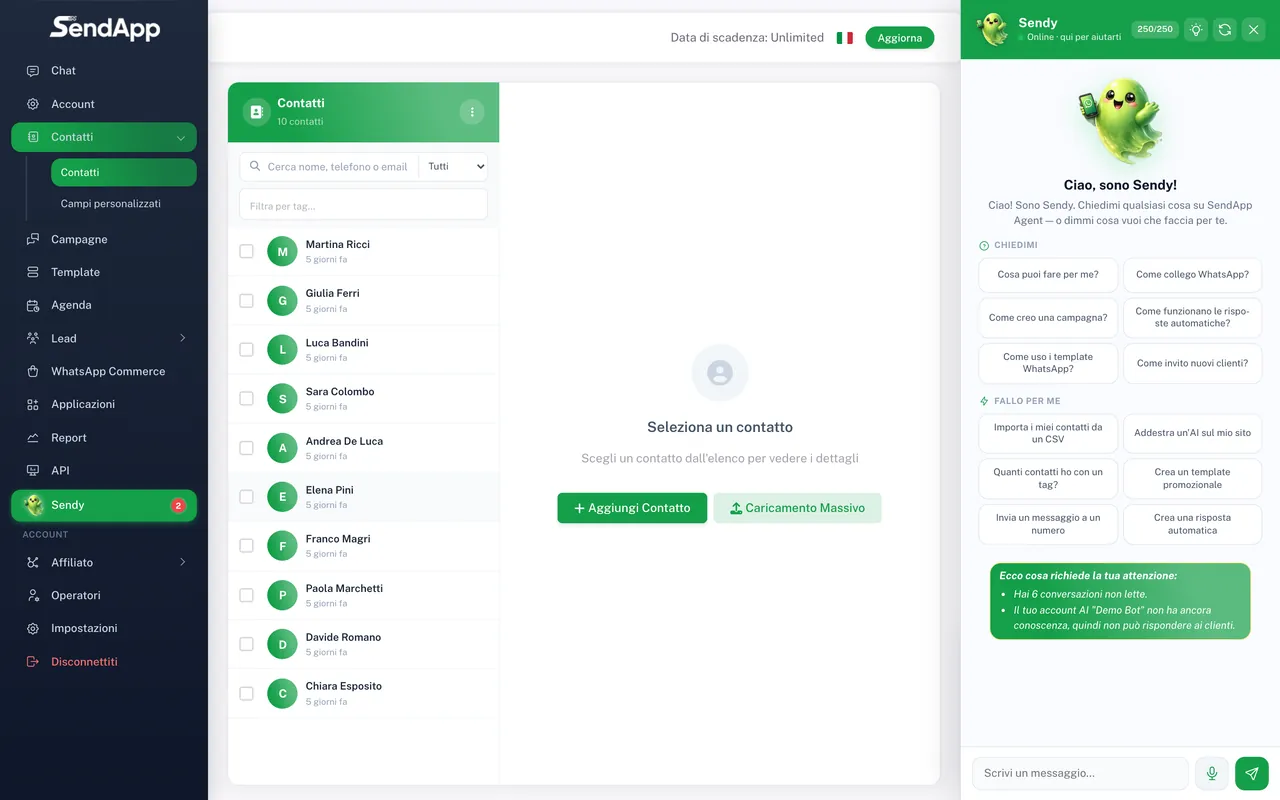
Creating and editing a contact
- 1
Open Contacts from the menu
You see the full list.
- 2
Press “New contact”
Enter the name and number in international format (e.g. +39…).
- 3
Add tags and fields
Assign the relevant tags and fill in any custom fields.
- 4
Save
The contact is now in the address book and available for campaigns.
Tags: how to use them well
Tags are free-form labels (e.g. “customer”, “lead”, “Milan”, “course-interested”). They serve to group contacts so you can send targeted campaigns. A contact can have multiple tags.
Define a few clear tags and use them consistently. Better 10 tags used well than 100 made up on the fly: well-organized tags become clean segments for campaigns.
Custom fields
Besides name and number, you can save extra information (city, date of birth, customer code, subscription expiry). Custom fields let you personalize messages and segment with precision.
Segments and export
- Filter by tag/fields to get a segment (e.g. all the “leads” in “Milan”).
- Use the segment as the recipients of a campaign.
- Export the filtered contacts for backup or external use.
Privacy notes
Only send promotional messages to people who have given consent. Keep track of the contact's source and honor deletion requests: it's a legal obligation as well as good anti-block practice.
Ready to put it into practice?
Open SendApp and follow the steps in this guide. Need help? Support is one message away.