Guide/SendApp Cloud/Plans & payments
Plans and payments
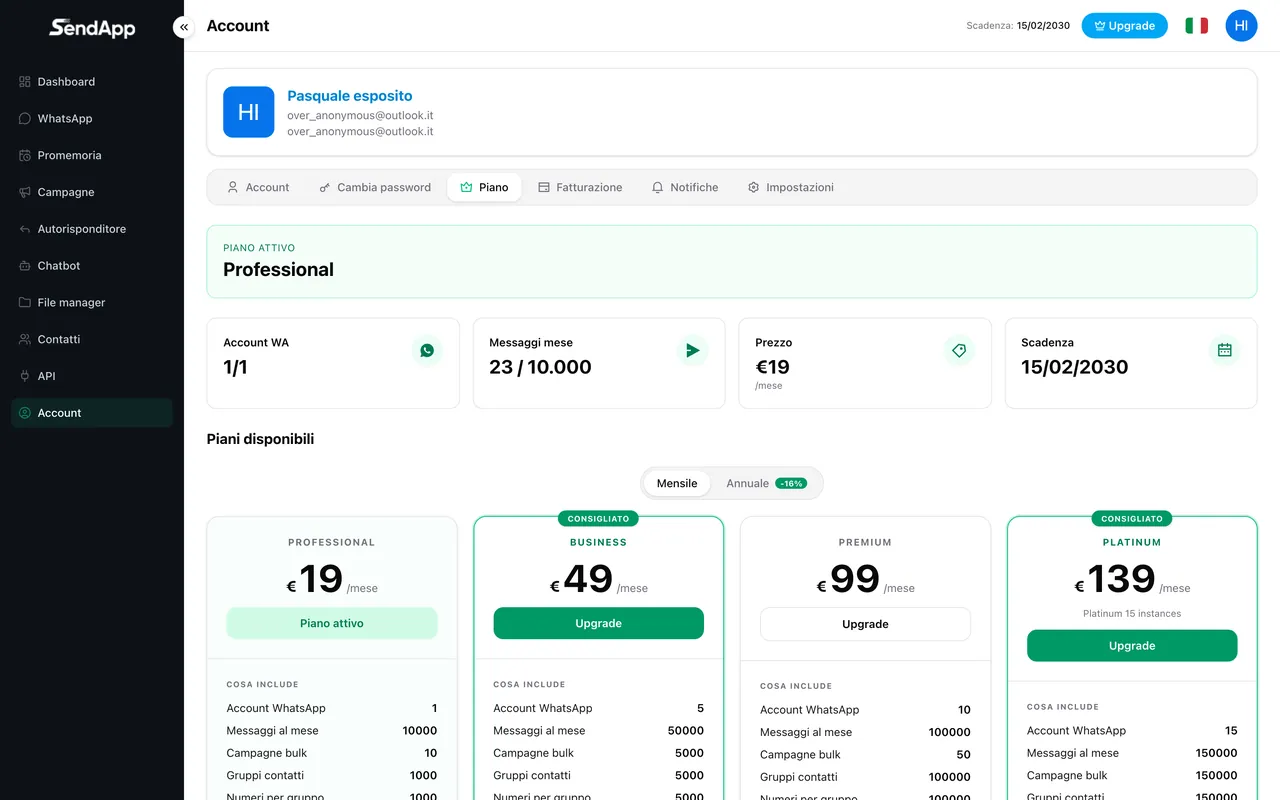
SendApp Cloud plans define how many numbers you can connect, how many messages you can send per month, and which features you have. Here we'll see how they're structured and how payments are handled.
Updated on June 16, 2026 · 5 min read
Before you start
- A SendApp Cloud account
What defines a plan
- WhatsApp accounts
- How many numbers you can connect at the same time (from 1 up to 15 on the higher plans).
- Messages per month
- The total monthly quota of messages sent across all accounts.
- Storage
- The space for the file manager's files.
- Features
- Some features (e.g. chatbot limits, media sending, scheduling) depend on the plan.
SendApp Cloud doesn't charge per individual message: you pay a fee (monthly or annual) with the quota included. There are no per-conversation rates typical of Meta's official API.
Payments and subscription
- Payments are made via Stripe or PayPal.
- The subscription is monthly or annual and renews each period.
- To upgrade, choose a higher plan and complete the payment: the new limits apply right away.
Cancelling your subscription may not be available directly in the interface: in that case, manage it from the payment provider's portal (Stripe/PayPal) using the subscription reference, or contact support.
Ready to put it into practice?
Open SendApp and follow the steps in this guide. Need help? Support is one message away.