Sendapp

Data Collection on WhatsApp: Automations with SendApp

By December 12, 2025No Comments

Collect data on WhatsApp without chasing customers: today you can

If you work in an industry where information gathering is a daily occurrence (insurance, real estate, private healthcare, training, utilities), you know the problem well: you ask for documents, confirmations, and personal information via email or phone, then you begin the never-ending chase. The customer puts off sending the request, loses the attachment, can't find the link, or responds only halfway. And you (or your team) end up spending hours calling, sending reminders, and copying and pasting into your CRM.

With SendApp you can move data collection directly to WhatsApp Business, transforming chat into a guided and measurable process: automated messages, intelligent reminders, structured forms and fields, notifications, and status transitions. The result? Less friction for the customer, faster processing for the company, and cleaner data for those who process it.

In this article we will see how to set up a modern flow of data collection on WhatsApp, with practical Italian examples and a focus on marketing automation And Conversational AI.

Why WhatsApp is the best channel for data collection (in Italy)

WhatsApp is a "natural" channel in Italy: it's already installed, familiar, and accessed multiple times a day. This completely changes the experience compared to email and portals.

The concrete advantages compared to email and telephone

  • Very high reading rate: the customer sees the message within minutes, not after hours or days.
  • Immediate interaction: responds with a tap, without login or password.
  • Reducing errors: guided questions and structured fields avoid incomplete answers.
  • Traceability: you know who read, who responded, who is stuck on a passage.
  • Reminder Automation: reminders are no longer dependent on operator memory.

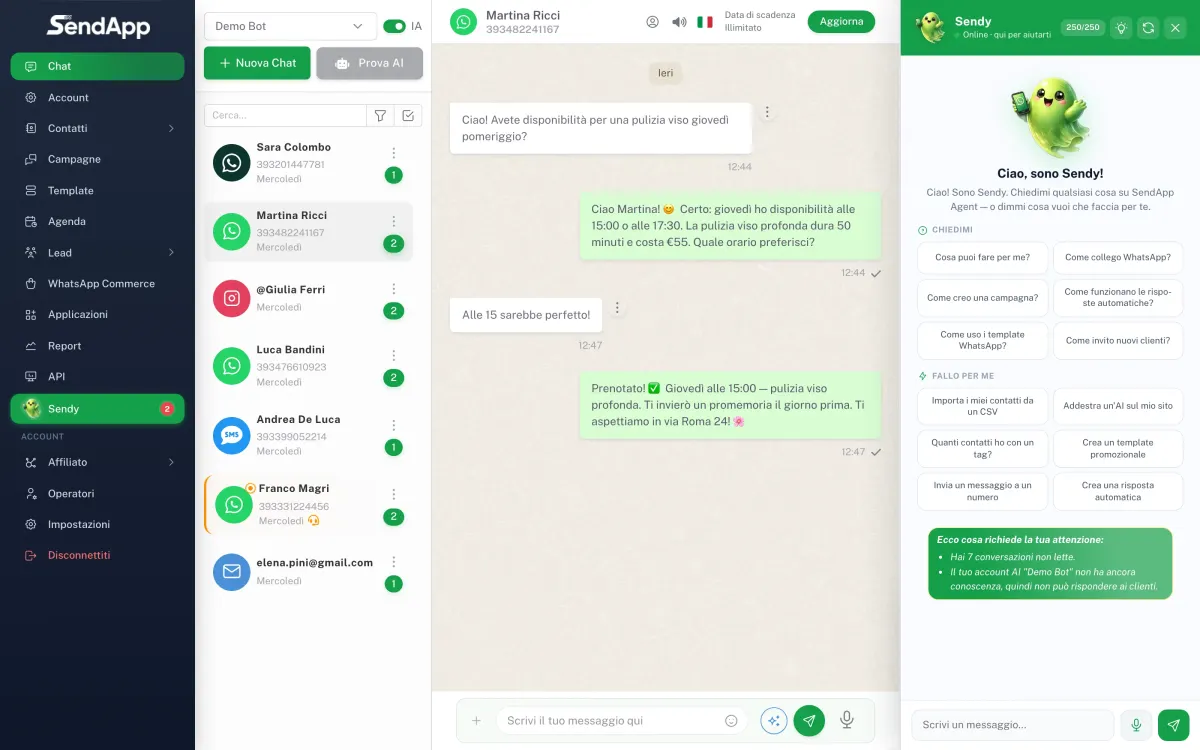
SendApp: A single control center for WhatsApp Business, automation, and data

SendApp was created to make WhatsApp a professional, scalable, and measurable channel. In practice, it allows you to:

  • Manage conversations centrally (teams and assignments).
  • Create WhatsApp campaigns and automated flows.
  • Collect data in a structured way (not just “free text”).
  • Integrate Conversational AI for automatic responses and qualification.
  • Connect WhatsApp to external systems via API.

If you want to delve deeper into the infrastructure part, here you can find the Official WhatsApp APIs of SendApp, essential for compliant mass mailings and advanced automations.

Use case #1: "Annual check" and customer data update via WhatsApp

One of the most typical (and time-consuming) scenarios is the periodic updating of data: contact details, residence, family composition, vehicle data, beneficiaries, contact preferences, consents.

How an effective flow works

  1. Initial message with a clear tone and a single goal: “We update your data in 60 seconds.”.
  2. Guided questions one at a time (reduces dropout).
  3. Validation (e.g., numeric postcode, valid email address, valid date format).
  4. Final summary: the customer confirms with “OK” or corrects.
  5. Tags and CRM updates: data is saved in an orderly fashion.

Practical example (insurance agency in Milan): in January, an annual check-up campaign launched for a segment of 1,200 clients. Using SendApp, the agency sent a personalized WhatsApp message with their name and policy, launched a chat questionnaire, and scheduled two automatic reminders. The result: more responses in fewer days and fewer follow-up calls.

Use case #2: Chaos-free claims management and document collection

When there's an accident or an urgent matter, the information often arrives in a disorganized manner: scattered photos, incomplete documents, vague descriptions. WhatsApp is perfect, but only if the process is guided.

Recommended flow in SendApp

  • Initial qualification: accident type, date, location.
  • Average collection: request sequential photos (e.g. “Upload photo 1: license plate”, “photo 2: damage”, “photo 3: context”).
  • Identification and any signed form (if required by your process).
  • Ticket creation and automatic assignment to the relevant department.
  • Status notifications: “Request received”, “In progress”, “An integration is needed”, “Closed”.

Practical example (broker in Rome): During a post-hail spike in requests, the company activates a guided process on WhatsApp. The user sends the requested photos, receives a summary, and the agent finds everything already sorted. The average processing time is reduced because less information is missing.

Use case #3: quotes and lead generation with marketing automation on WhatsApp

WhatsApp isn't just about customer support: it's also a powerful channel for acquiring and converting leads. With SendApp, you can automate the pre-qualification process and ensure only "hot" contacts reach your agent.

An Italian example: real estate and viewing requests

A Turin real estate agency promotes a listing and invites users to message on WhatsApp. Using a SendApp flow:

  • The bot asks for budget, area, timing.
  • It offers 2-3 coherent properties.
  • Collects hourly availability.
  • If the lead is eligible, they pass the chat to a consultant with all the information ready.

This is marketing automation applied well: it reduces response times and increases appointment rates.

Raccolta dati su WhatsApp: automazioni con SendApp

Smart reminders: the real lever to increase conversions and completions

The difference between a "nice" process and a process that actually works is the reminders. In many cases, the customer isn't opposed; they're just busy. Automatic reminders on WhatsApp solve this problem.

How to set effective reminders (without being intrusive)

  • Timing: 24 hours after the first message, then 72 hours, then stop.
  • Different copy: don't repeat the same text, change angle ("you're missing 2 steps").
  • Micro-lens“Complete in 30 seconds” works better than “Fill out the form.”.
  • Elegant exit: “If you prefer, reply with 'OPERATOR' and we will help you.‘.

With SendApp you can orchestrate these steps automatically, maintaining control over frequencies and segments.

Conversational AI on WhatsApp: Less work for the team, more quality for the customer

As volumes grow, the bottleneck is always the same: the team can't respond to everyone with the same speed and consistency. This is where the’Conversational AI.

What an AI Agent Can Do on WhatsApp (Really Useful)

  • Answering FAQs (timetables, required documents, deadlines, costs).
  • Gather information before passing to an operator (triage).
  • Summarize the conversation for the operator: context, need, key data.
  • Managing peaks (campaigns, emergencies, seasonality) without losing leads.

If you want to see how a chatbot with ChatGPT integrated works, learn more AI Chatbot with SendApp.

Step-by-step notifications: guiding the customer to the end

An effective data collection workflow leaves the customer in no doubt. Each step must be clear, brief, and actionable.

Message sequence example

  • “You need 2 minutes: shall we get started?”
  • “Step 1/4: Confirm your address?”
  • “Perfect. Step 2/4: Upload a photo of your document.”
  • “You’re almost there: Step 3/4…”
  • “Thank you! We received everything. We'll keep you updated here on WhatsApp.”

This approach reduces dropout because it makes the process predictable and reassuring.

Best Practices: How to Design a Team-Friendly WhatsApp Data Collection

1) Start with the minimum essential data

Asking too much at the beginning will lower completion rates. Start with 3-5 key pieces of information and then expand if necessary.

2) Segment and personalize

New customers, existing customers, open cases, and renewals aren't the same thing. With SendApp, you can differentiate your messages and paths.

3) Always provide the “operator” exit”

An automated flow shouldn't be a dead end. Users should be able to ask for help at any time.

4) Measure: response rate, completion, average time

Optimize as you would a landing page: copy, order of questions, reminder timing.

5) Integrate with your systems

Whenever possible, connect WhatsApp to CRM and management systems via API to avoid manual re-entries and reduce errors. Starting point: WhatsApp API.

Operational Checklist: What You Can Automate This Week

  • Sending a WhatsApp data check message to a customer segment.
  • Automatic reminders for those who do not complete within 24/72 hours.
  • Collecting documents for a recurring procedure (e.g., claim, onboarding, renewal).
  • Pre-qualify leads from campaigns (Facebook/Instagram/Google) with chat questions.
  • Activation of an AI assistant for FAQs and triage.

If you want a quick assessment of which flow has the highest ROI in your case, you can start with a consultancy.

How SendApp can help you

SendApp offers complete solutions to manage WhatsApp Business professionally and efficiently:

Leave a Reply