


Whatsapp Notifications on Shopify
Send abandoned cart recovery messages
Order notifications via WhatsApp/SMS to increase
engaging with your customers through
our free SendApp integration.
SendApp instructions for sending notifications with Shopify
Set up Webhooks on Shopify for Sendapp.cloud
What is a webhook and what is it used for?
Webhooks are a necessary tool for synchronizing external apps and services and executing code when a specific event occurs in the store, such as when a new product is created or an order is placed. In the case of this guide, The webhook is used to notify Growish Charity that a customer has completed an order so that the donation system can be activated.
How to create a webhook
- From your Shopify admin, go to Settings > Notifications
- Scrolling down, you will find the section Webhooks
- Click on Create a webhook
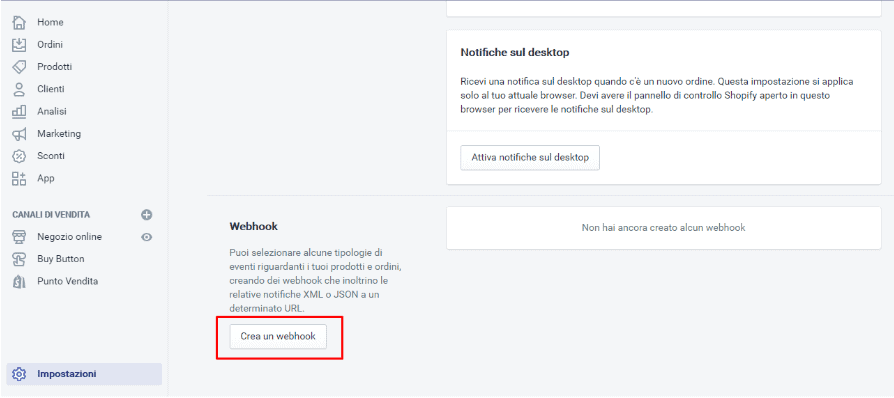
Elements of a webhook
To create a webhook You need to have the following items:
- Event (what needs to happen on the store for the webhook to fire, e.g. an Order Completed)
- Format
- URL webhook destination
- API Version

Create a custom notification URL with Sendapp.cloud
Our goal is to provide as many features as possible so that you, as a site owner, can configure the plugin the way you want, while maintaining an easy-to-understand interface. But it's always good to know all the options.
The plugin is divided into three main sections Setup, Configuration, Help.
Setting
This way, you will be able to set up the Sendapp APIs and Gateway that you intend to use for sending WhatsApp messages and SMS. .
Sendapp Cloud API
If you have the https://sendapp.cloud plan you can create an instance with your personal multi-session WhatsApp account or your business multi-session WhatsApp account
After creating the instance you can copy your Token and your Instance ID to paste it into your WordPress Sendapp Notification plugin
Email Sendapp Connect
If you have Sendap Connect in the WordPress plugin, you must enter the same email configured on your Sendapp Connect to send notifications.
Sendapp SMS API
If you have the SMS Gateway from https://sms.sendapp.live you can access your API KEY to copy and paste it into your WordPress plugin
Placeholders for message template
Below is a list of placeholders you can use in your message template.