

With SendApp Connect's Free APIs
Designed for small and medium-sized businesses,
to revolutionize customer communication.
Whatsapp API for sending notifications from any platform
Sendapp Connect API
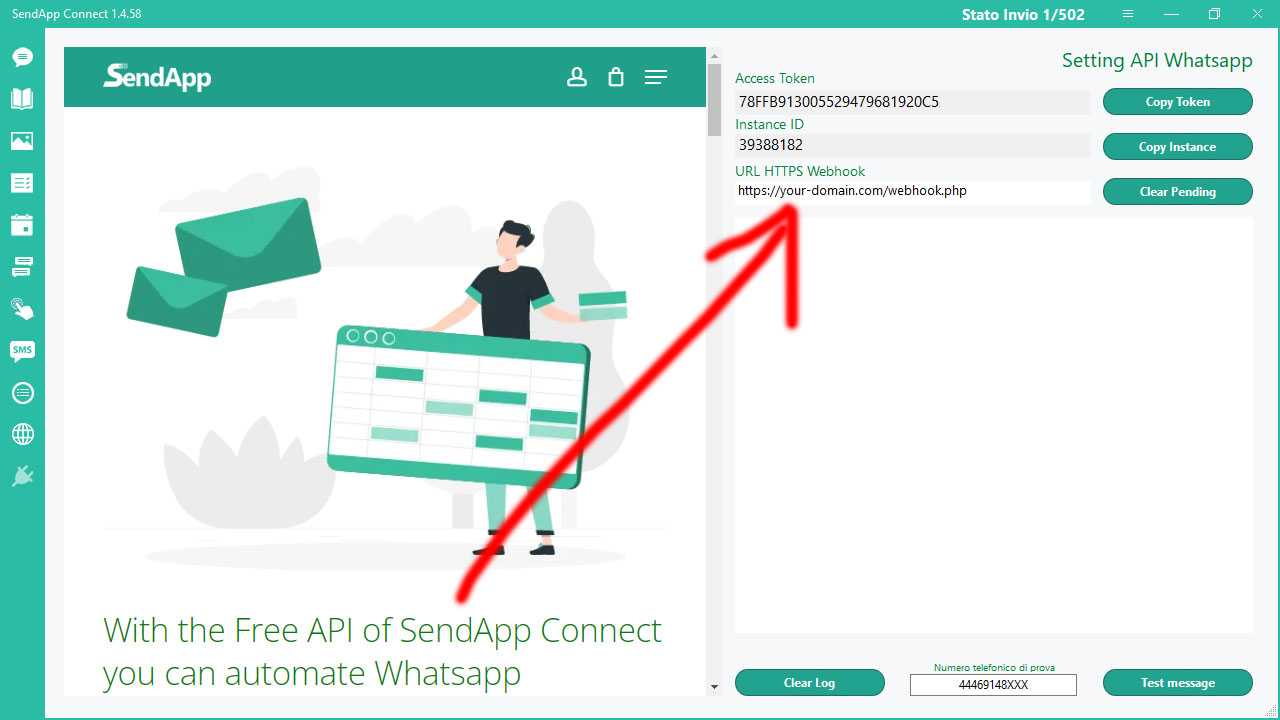
If you have the SendApp Connect desktop software, you can create an instance with your personal or multi-session business WhatsApp account.
After creating the instance you can copy your Token and your Instance ID and customize the APIs in any of your web, desktop, or mobile platforms.

API Documentation
POST Get QR Code
https://api.sendapp.live/getqrcode.php?instance_id=44345788XXX&access_token=612D62D6E8536446BAxxxxxxxxx Display QR code to login to Whatsapp web. You can get the results returned via Webhook
Params
| instance_id | 44345788XXX |
| access_token | 612D62D6E8536446BAxxxxxxxxx |
Send Direct Message API
POST Send Text
https://api.sendapp.live/send.php?number=44345788XXX&type=text&message=test%20message&instance_id=609ACF283XXXX&access_token=612D62D6E8536446BAxxxxxxxxx Send a text message to a phone number through the app
Params
| number | 44345788XXX |
| type | text |
| message | test message |
| instance_id | 609ACF283XXXX |
| access_token | 612D62D6E8536446BAxxxxxxxxx |
POST Send Media & File
https://api.sendapp.live/send.php?number=44345788XXX&type=media&message=test%20message&media_url=https://i.pravatar.cc&filename=file_test.jpg&instance_id=609ACF283XXXX&access_token=612D62D6E8536446BAxxxxxxxxx Send a media or file with message to a phone number through the app
Params
| number | 44345788XXX |
| type | average |
| message | test message |
| media_url | https://i.pravatar.cc |
| filename (Just use to send document) | file_test.pdf |
| instance_id | 609ACF283XXXX |
| access_token | 612D62D6E8536446BAxxxxxxxxx |
Group Api
POST Send Text Message Group
https://api.sendapp.live/sendgroupmsg.php?group_id=84987694574-1618740914@g.us&type=text&message=test%20message&instance_id=609ACF283XXXX&access_token=612D62D6E8536446BAxxxxxxxxx Send a text message to a group through the app
Params
| group_id | 84987694574-1618740914@g.us |
| type | text |
| message | test message |
| instance_id | 609ACF283XXXX |
| access_token | 612D62D6E8536446BAxxxxxxxxx |
POST Send Media & File Message Group
https://api.sendapp.live/sendgroupmsg.php?group_id=84987694574-1618740914@g.us&type=media&message=test%20message&media_url=https://i.pravatar.cc&filename=file_test.jpg&instance_id=609ACF283XXXX&access_token=612D62D6E8536446BAxxxxxxxxx Send a media or file with message to a group through the app
Params
| group_id | 84987694574-1618740914@g.us |
| type | average |
| message | test message |
| media_url | https://i.pravatar.cc |
| filename (Just use to send document) | file_test.pdf |
| instance_id | 609ACF283XXXX |
| access_token | 612D62D6E8536446BAxxxxxxxxx |
SendApp Webhook API endpoint
If you have the SendApp Connect desktop software, you can create a PHP file on your server with SSL certificate,
to receive all messages from your customers in JSON format. Once you've configured your PHP file,
you will simply need to enter the URL into your SendApp Connect.
This way, all incoming messages from your WhatsApp account will be sent to your endpoint in json format.