


WhatsApp – SMS Chat, Order Notifications
Send abandoned cart recovery messages
Order notifications via WhatsApp/SMS to increase
engaging with your customers through
our free WooCommerce integration.
Instructions for using the SendApp WordPress Woocommerce plugin
Install and activate the Sendapp plugin
There are two different ways to install a Sendapp plugin.
From the WordPress admin dashboard (/wp-admin)
- Download the “.zip file” – from the “Download” tab”
- Do not unzip the downloaded .zip file
- Log in to your WordPress admin panel.
- Select Plugins, then Add New.
- Select Load Plugin.
- Sfoglia il computer per selezionare il file “wp-woo-notify-sendapp.zip”.
- Click Install Now and WordPress will do its magic and install the plugin.
- Once the installation is complete, activate the plugin.
Via FTP
We recommend that only experienced users use the FTP method.
- Download the “.zip file” – from the “Download” tab”
- Before attempting to upload your theme you must unzip the downloaded file “sendapp-wp.zip”
- Open your FTP client and open your plugins folder (wp-content / plugins /)
- Move the unzipped files (wp-woo-notify-sendapp.zip) in the plugins folder.
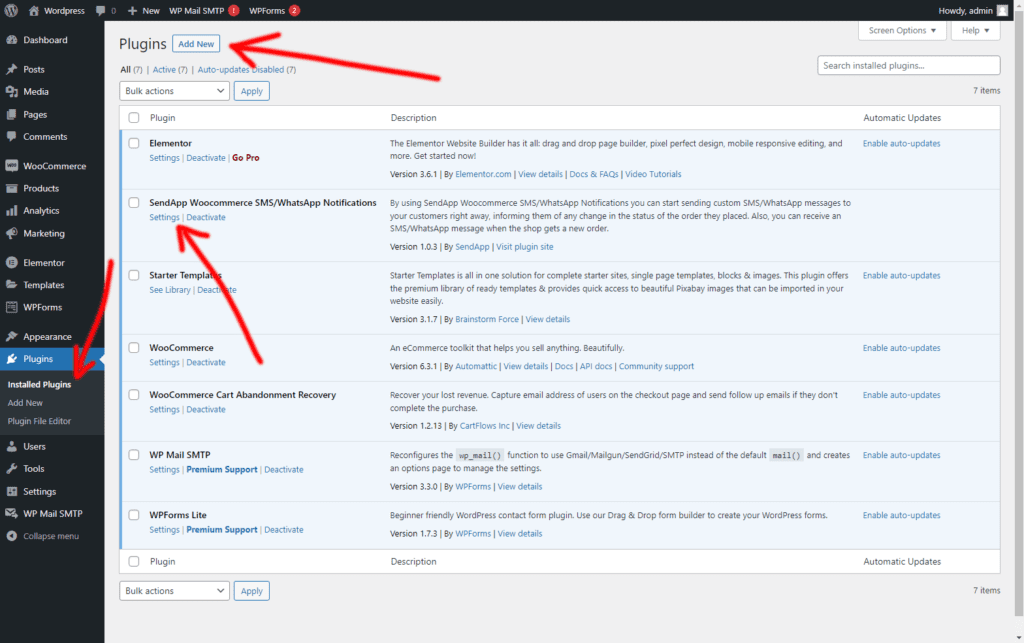
- Now go to your WordPress admin dashboard => Plugins => Installed Plugins and then Activate the Sendapp plugin from there.
Setting
Our goal is to provide as many features as possible so that you, as a site owner, can configure the plugin the way you want, while maintaining an easy-to-understand interface. But it's always good to know all the options.
The plugin is divided into three main sections Setting, Configuration, Guide.
Setting
This way, you will be able to set up the Sendapp APIs and Gateway that you intend to use for sending WhatsApp messages and SMS. .
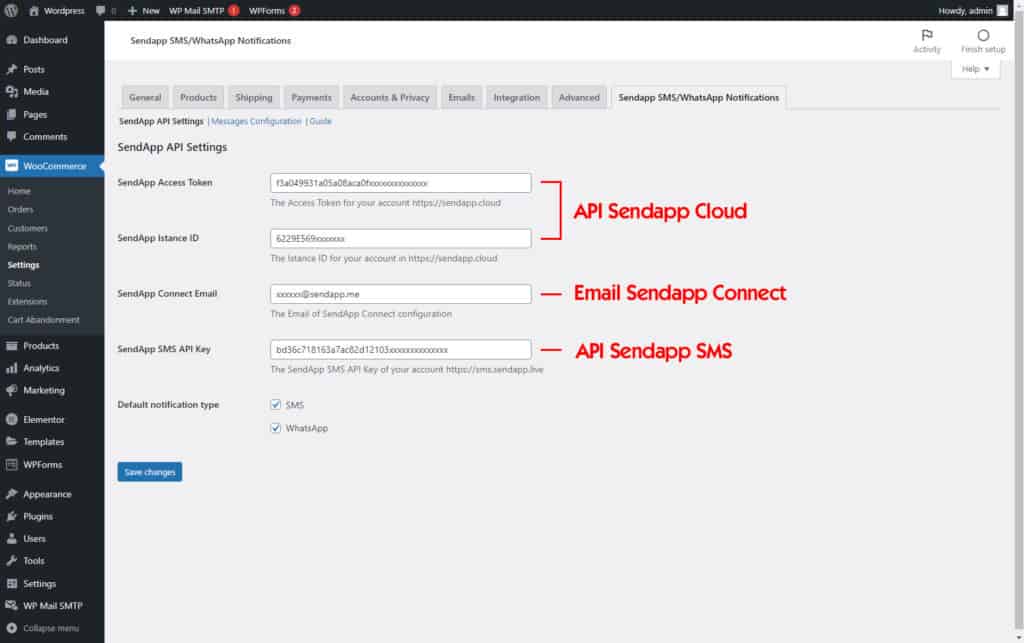
Sendapp Cloud API
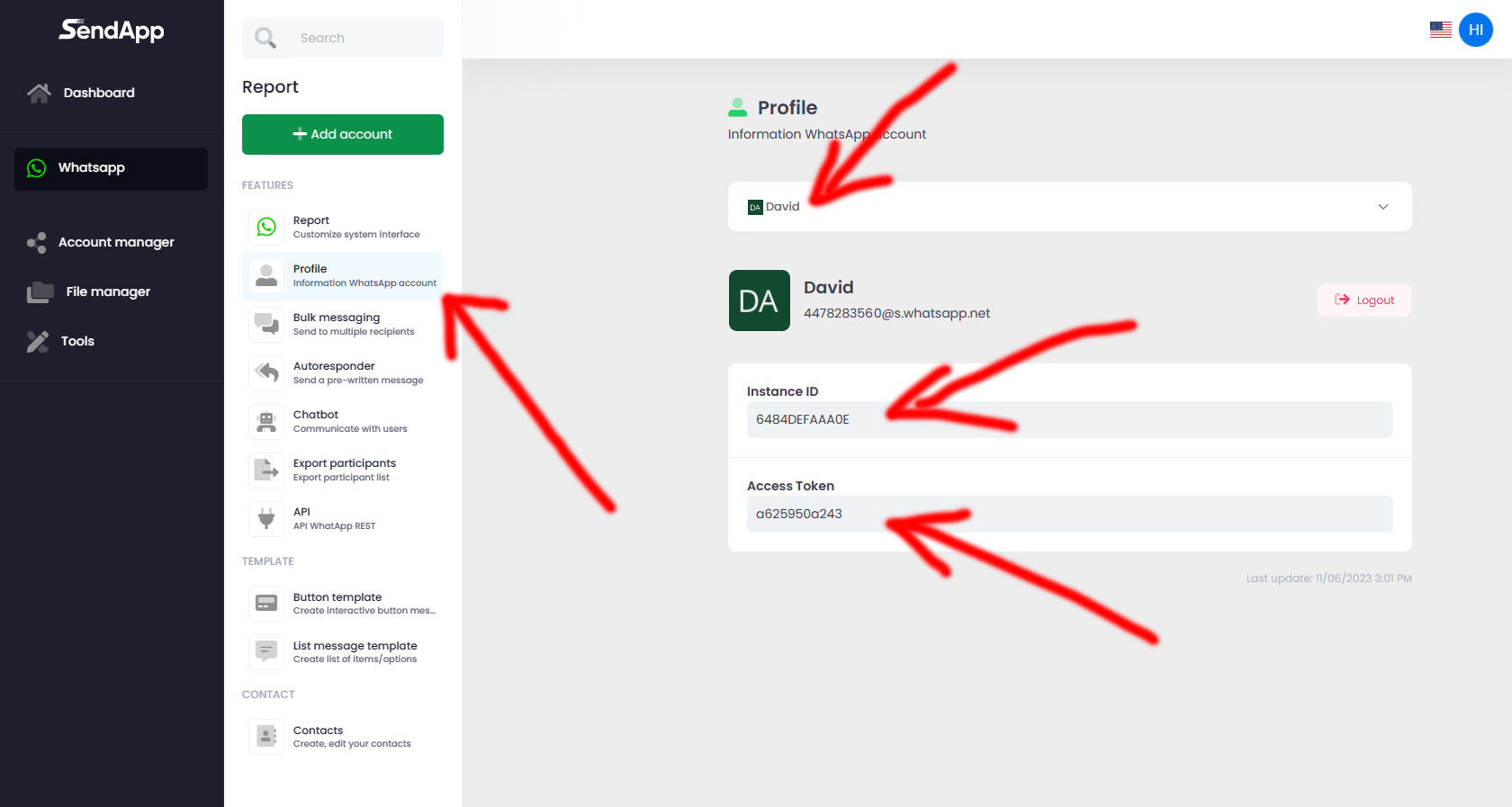
If you have the plan of https://app.sendapp.cloud You can create an instance with your personal multi-session or business multi-session WhatsApp account.
After creating the instance you can copy your Token and your Instance ID to paste it into your WordPress Sendapp Notification plugin
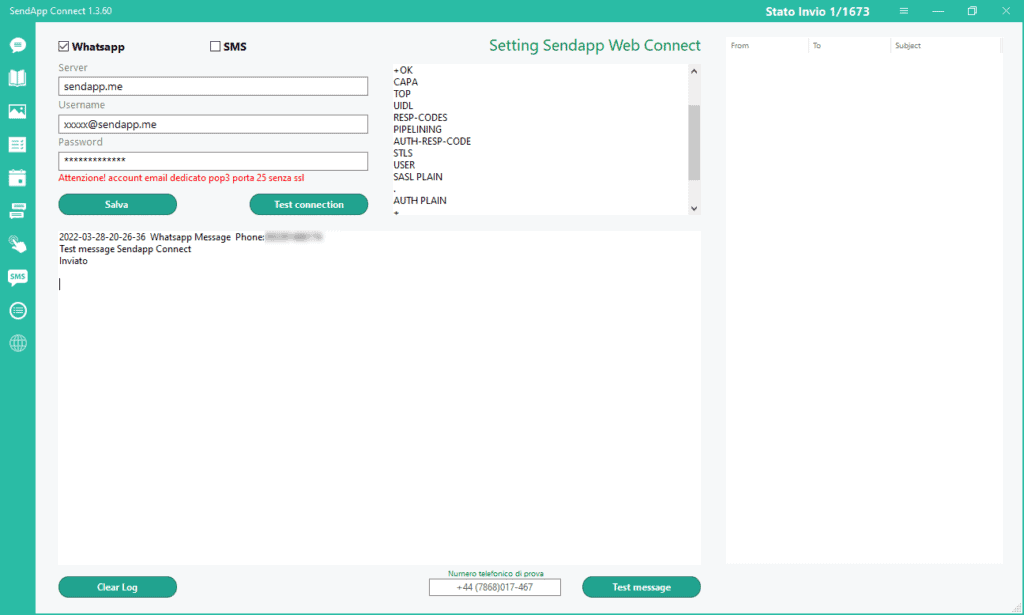
Email Sendapp Connect
If you have Sendap Connect in the WordPress plugin, you must enter the same email configured on your Sendapp Connect to send notifications.
Sendapp SMS API
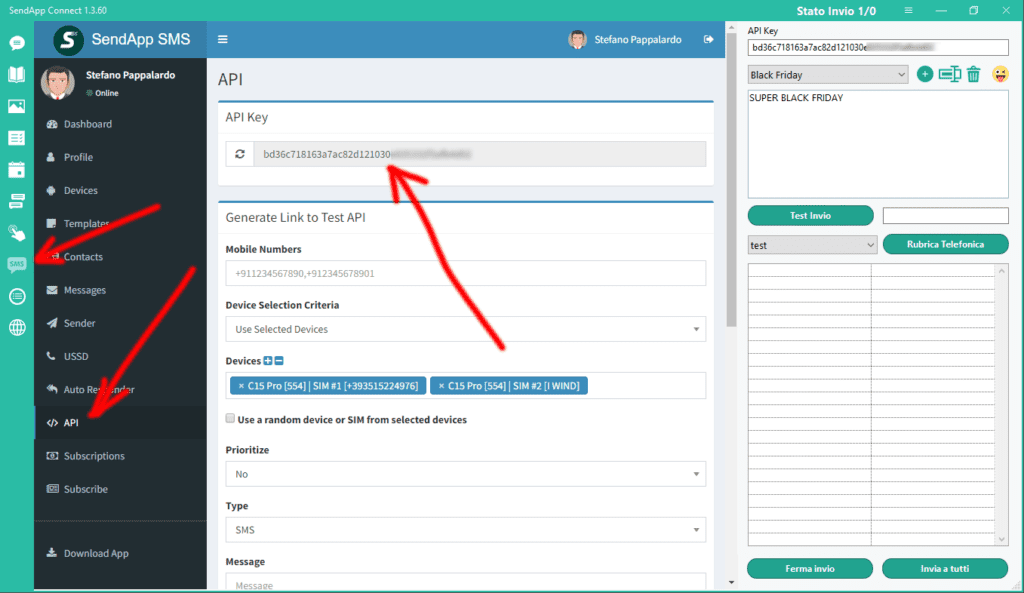
If you have the SMS Gateway of https://sms.sendapp.live puoi accedere alla tu API KEY per copiarla ed incollarla nel tuo plugin di WordPress
Configuring notification messages
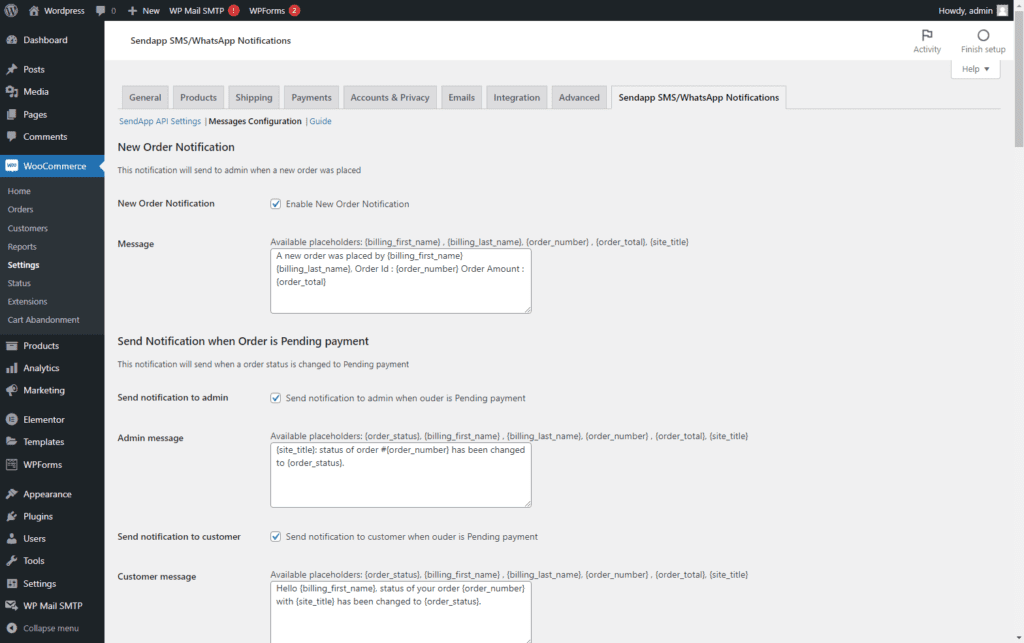
Message Configuration
In this session you can activate and customize the notification messages you want to send to your customers.
Configuring abandoned cart messages
Configurazione messaggi carrello abbandonato.
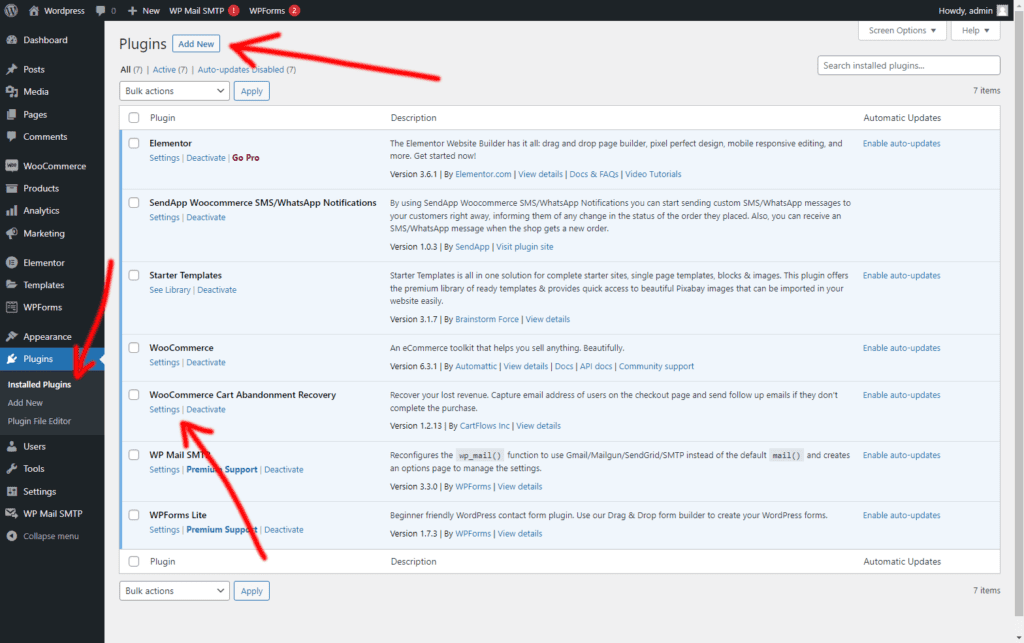
Per attivare l’invio di notifiche del carrello abbandonato è necessario installare questo plugin gratuito nel tuo WordPress
https://wordpress.org/plugins/woo-cart-abandonment-recovery/
Questo ti aiuterà ad aumentare le conversioni del tuo eCommerce.
Settaggio del Plugin carrello abbandonato.
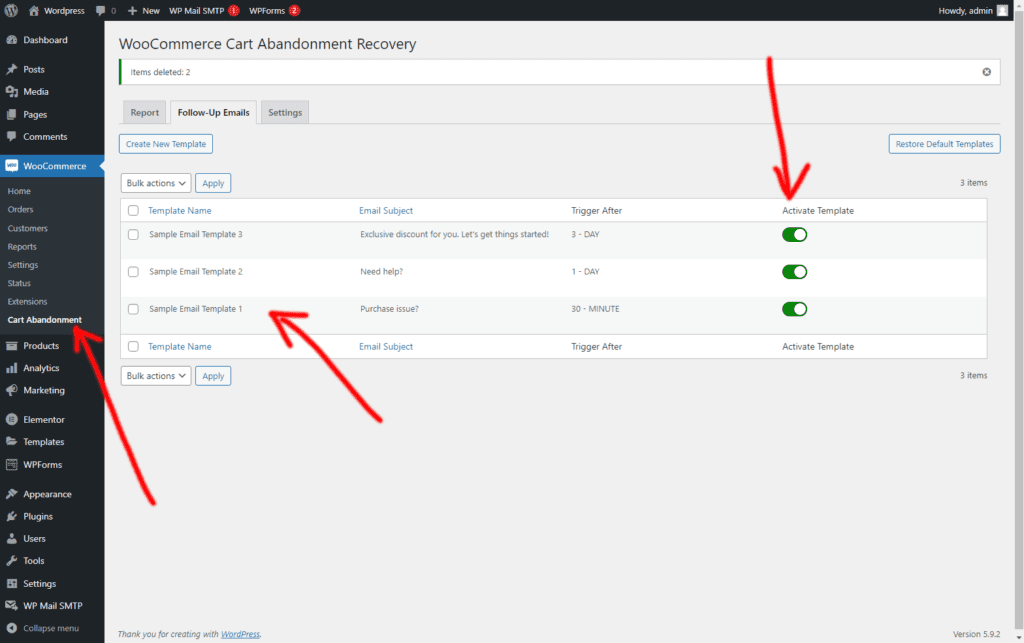
Per attivare le notifiche del carrello abbandonato vai sul tab Follow-Up Emails,
* Personalizza il template
* Imposta l’orario dell’evento della notifica (Trigger)
* Attiva il Template della notifica preferita.
Placeholders for message template
Below is a list of placeholders you can use in your message template. The shortcodes are grouped together below for easy reading and finding.
General
| {{site name}} | Site Name |
| {{Wc-ordine}} | Order number |
| {{Wc-order-id}} | Order ID / Post ID |
| {{Wc-end-date}} | Order date |
| {{Wc-order status check}} | Order status |
| {{-Payment-method wc}} | Payment Method |
| {{Wc-transaction-id}} | Payment Transaction ID |
| {{Wc-transport-method}} | shipping method |
| {{First-wp-name}} | First name |
| {{Wp-last-name}} | Surname |
| {{Wp-username}} | Username |
| {{Wp-nickname}} | nickname |
| {{Wp-display-name}} | Display name |
| {{Wp-mail}} | |
| {{Wp-user-website}} | User's Website |
| {{Wp-user-bio}} | User biography |
| {{wc-products-names}} | All item/product names in order |
| {{Wc-prodotto-name-count}} | Name first object then item counter |
| {{WC-total-products}} | Total number of products in order |
| {{WC-total-items}} | Total number of items on order |
| {{wc-order-items}} | Names of all products in order with item counter |
| {{Wc-fine-amount}} | Total amount (VAT included) |
| {{Wc-discount}} | Total discount amount |
| {{Wc taxes}} | Total tax amount |
| {{Wc-end-quantity-ex-taxes}} | Total amount (VAT excl.) |
| {{Wc-transport-cost}} | Shipping costs |
| {{Wc-refund-amount}} | Amount refunded |
| {{Wc-refund-reason}} | Reason for refund |
| {{wc-order-note}} | Order Notes Provided at Time of Order |
| https://yoursiteurl.com/checkout/order-received/{{wc-order}}/?key={{post-_order_key}} | WC Order Confirmation Link |
| https://yoursiteurl.com/checkout/order-pay/{{wc-order}}/?pay_for_order=true&key={{post-_order_key}} | Link to the Pending Payment page |
WooCommerce Billing Details
| {{Wc-billing-first-name}} | Billing Name |
| {{Wc-billing-last-name}} | Billing Surname |
| {{Wc-billing-company}} | Billing company |
| {{Wc-billing-Address-line-1}} | Billing address line 1 |
| {{Wc-billing-Address-line-2}} | Billing Address Line 2 |
| {{Wc-billing-city}} | Billing City |
| {{Wc-billing-Cap}} | Postal code / Billing postal code |
| {{Wc-billing-status}} | Billing State/County |
| {{Wc-billing-country}} | Billing Country |
| {{Wc-billing-mail}} | Billing email |
| {{Wc-billing-phone}} | Billing Phone |
WooCommerce Shipping Details
| {{Wc-transport-first-name}} | Shipping name |
| {{Wc-transport-last-name}} | Shipping Surname |
| {{Wc-transport-company}} | Shipping company |
| {{Wc-transport-address-line-1}} | Shipping address line 1 |
| {{Wc-transport-address-line-2}} | Shipping address line 2 |
| {{Wc-transport-city}} | Shipping City |
| {{Wc-transport-Cap}} | Shipping Postal Code / ZIP Code |
| {{Wc-transport-state}} | Shipping Status |
| {{Wc-transport-country}} | Shipping country |
Stock market notifications
| {{product name}} | Product Name |
| {{Product-quantity}} | Quantity of product |
Multi-vendor/marketplace plugin notifications
| {{vendor-product-names}} | Product Name |
| {{vendor-total-items}} | Total number of items on order |
| {{vendor-Order-articles}} | Names of all products in order with item counter |
| {{Vendor-end-amount}} | Total amount (VAT included) |
New post
| {{post title}} | Post title |
| {{Post-contents}} | Publish content |
| {{Post-link}} | Insert link |
| {{Post-extract}} | Postal extract |
| {{Post-author}} | Postal Author |
| {{publication date}} | Publication date |
| {{Post-category}} | Mail category(ies) |
| {{post-tag}} | Post tags |